

Product Designer
8 weeks
Product thinking
User research
Visual design


At the same time, there are countless customers waiting for their orders to be picked up.
Many factors are at play but here are 3 main reasons...

There are too many Dashers in the same area, which increases the competition to receive good orders.
.svg)
Dashers generally follow the rule of $2 per mile driven. No tip and long distance orders are usually declined.

Higher density areas –cities and college towns –usually have more available orders.
I focused on solving the "bad orders" pain point.

How might we make "bad orders" worthwhile for Dashers?
How might we give Dashers a more proactive opportunity rather than just wait idly by?
How might we give more orders to waiting Dashers?
"Been sitting in a hotspot for over an hour. Got 3 party city orders in a row. Declined them all. Now I haven't received a single order for 50 minutes. This just isn't doable anymore. I used to be able to make 50 bucks by midday if putting in a full 8 hour day. Im lucky if I make 50 all day. I just can't do this anymore."
A new way for Dashers to receive orders, where they can be more proactive during their shift.

A map to view every store with available orders. It shows Dashers where the hotspots are.
Reserve some or all orders. Dashers can pick and chose which orders to deliver.
No one can reserve all the orders for themselves. There's a time limit in place to prevent this situation.

Let me take you through my process.
Once they've started their dash, Dashers often find themselves in a situation where they must wait patiently to receive an order, with limited options other than simply sitting back and waiting.
Instead of waiting, I aimed to create a new flow that allowed Dashers to take action, rather than just wait for a "good order" to come.

After some iterations, I designed a floating action button and new screens that took Dashers to an alternative user flow.

In this stage, I did a round of testings to make sure my prototype makes sense to users, both Dashers and non Dashers.
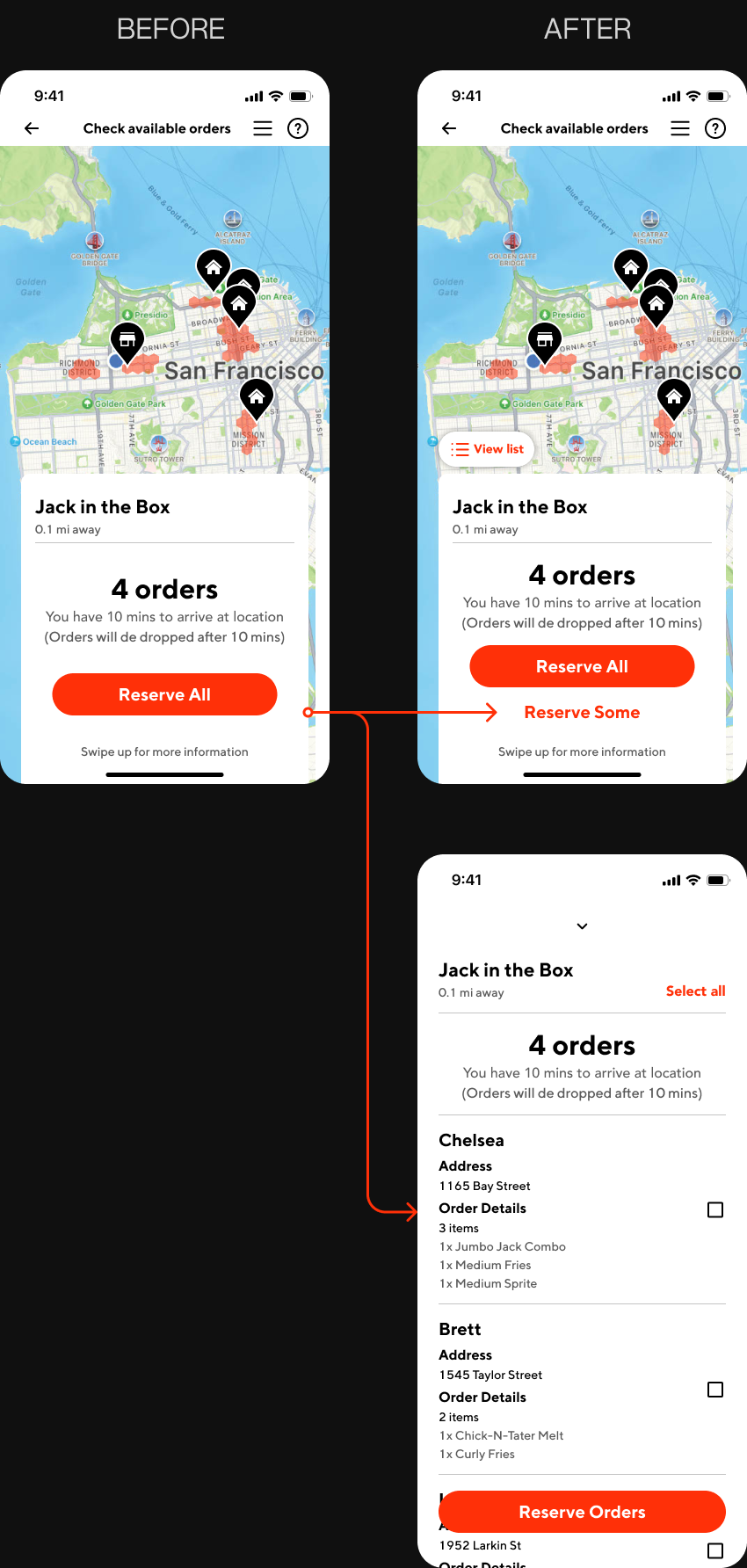

Instead of waiting, I aimed to create a new flow that allowed Dashers to take action.


An accessible button that takes the user right to all the available orders that are ready to be delivered.
Dashers have the option of reserving all or some of the available orders. The order details show each customer's drop-off location and the items in their order.

View available orders any way you want.


This project holds a special place for me, as my close friend is a DoorDash driver. I learned to very intentional with my decisions to ensure a seamless integration with the existing app and a consistent user experience.
%201.png)